How to Verify Muha Meds: Step-by-Step Authenticity Guide
Wondering how to verify Muha Meds products and identify potential counterfeits? This guide explains how to use the manufacturer’s official verification system, inspect product packaging, understand verification results, and find additional product information.
At Muha Meds Flavor, we believe that product research should start with reliable information. Whether you are researching Muha Meds All-In-One products, cartridges, or a particular flavor, verifying authenticity is an important step.
Important: The verification process depends on the product generation. Always follow the instructions provided by the manufacturer for your specific product.
Official Muha Meds Verification Website
The best starting point is the manufacturer’s official verification page:
Visit the official Muha Meds verification page
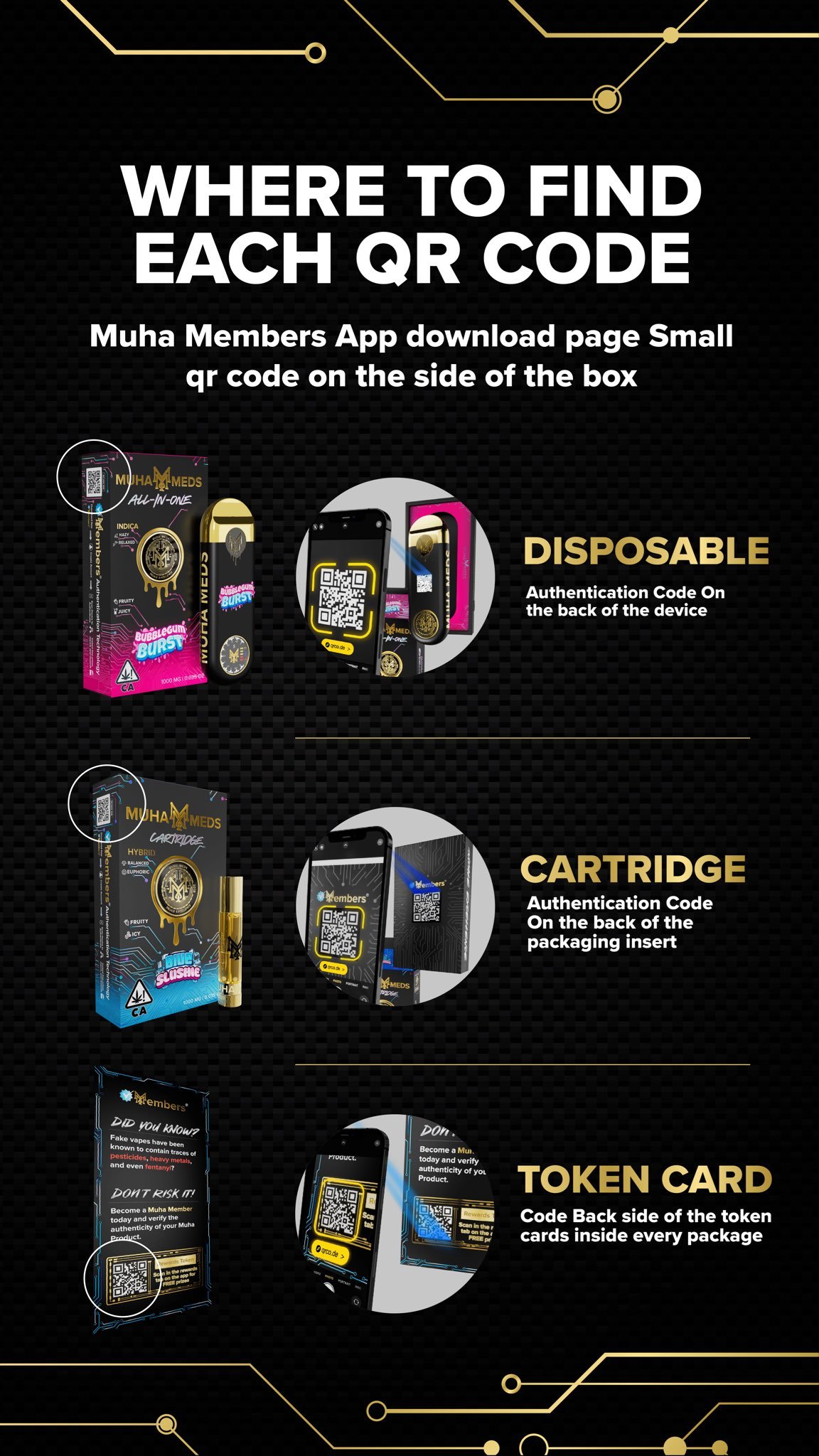
According to the manufacturer’s published instructions, certain second-generation products use scratch-off verification codes, while third-generation products use the Muha Members app to scan the product code. Follow the method that matches your packaging.
How to Verify Muha Meds in 5 Steps
Step 1: Locate the Verification Label
Examine the product packaging and look for a verification sticker, security code, or QR code. The exact placement and appearance may vary by product generation.
Check that the packaging includes the relevant product information and that the verification label does not appear damaged or tampered with.
Step 2: Identify Your Product Generation
Before scanning or entering a code, identify which verification instructions apply to your product.
Second-generation products: The manufacturer’s instructions describe a scratch-off verification code.
Third-generation products: The manufacturer’s instructions direct users to the Muha Members app to scan the product code.
If you are unsure which method applies, consult the official Muha Meds verification instructions.
Step 3: Reveal the Code or Open the Verification App
For a product with a scratch-off label, carefully reveal the code according to the packaging instructions.
For a product that uses app-based verification, access the Muha Members app through the download links supplied by the official manufacturer website.
Avoid entering security codes on unfamiliar websites or following QR codes that redirect to suspicious domains.
Step 4: Submit or Scan the Verification Code
Follow the appropriate instructions on the official verification page or in the verification app.
Check that the information displayed corresponds to your product. Do not rely solely on a website’s appearance, logo, or claim that a product is authentic.
Step 5: Review the Result Carefully
Read the verification response and check the product details against the packaging.
If the code fails, the result is unclear, or the product information does not match, stop and contact the manufacturer through its official contact page.
A failed verification attempt does not automatically prove that a product is counterfeit, and a successful result should not replace other authenticity checks.
What If Your Muha Meds Verification Code Does Not Work?
A verification code may fail for several reasons, including an incorrect entry, a scanning problem, an incompatible verification method, or an issue with the verification service.
If you encounter a problem, follow these steps:
Recheck the code against the label and correct any typing errors.
Confirm that you are using the verification method intended for your product generation.
Follow the manufacturer’s official instructions rather than relying on a third-party verification page.
If the problem continues, contact the manufacturer and provide the product details and verification error.
Avoid using the product until you have resolved significant concerns about its identity or contents.
Never share a verification code publicly. If you need assistance, provide it only through a verification or support channel you have independently confirmed is official.
How to Recognize Potentially Fake Muha Meds Products
Verification codes are useful, but they are not the only thing to check. Consider these potential warning signs:
Damaged security labels: The verification sticker appears altered or removed.
Inconsistent packaging: Product names, spelling, or printed details do not match the expected product information.
Unclear sourcing: The seller cannot provide reliable information about the product’s origin.
Mismatched documentation: Laboratory reports or batch details do not correspond to the product being examined.
Unusual verification results: A code produces an error or information that does not match the packaging.
These warning signs are not definitive proof of counterfeiting. Packaging can be copied, and technical issues can affect verification systems. When in doubt, seek confirmation directly from the manufacturer.
How to Verify Different Muha Meds Products
Muha Meds All-In-One
For All-In-One products, examine the packaging, identify the correct verification method, and review the product-specific information.
Explore our Muha Meds All-In-One collection for related product information.
Muha Meds Cartridges
Cartridges may have different packaging and product specifications from all-in-one devices. Do not assume that the same verification instructions apply to every product.
Browse our Muha Meds product collection to find the listings available on our website.
Muha Meds Lemon Cherry Gelato
If you are researching Lemon Cherry Gelato, use the full product name to identify the exact item you are checking. A flavor name alone does not establish authenticity or confirm the contents of a product.
Read our Muha Meds All-In-One Lemon Cherry Gelato guide for the product information listed on our website.
Authenticity Verification vs. Laboratory Testing
It is important to understand the difference between product authentication and laboratory testing.
Authenticity verification helps establish whether a product’s code or identifier corresponds to the manufacturer’s verification system.
Laboratory testing evaluates the sample submitted to a testing laboratory for specified substances or contaminants.
Packaging inspection helps identify discrepancies but cannot independently establish authenticity.
Where laboratory documentation is available, check the laboratory’s identity, report date, product details, and batch information. A report for a different product or batch should not be treated as proof about the item you are examining.
For general information about cannabis and related health considerations, consult the U.S. Centers for Disease Control and Prevention.
Frequently Asked Questions About Muha Meds Verification
1. Where can I verify Muha Meds products?
Start with the manufacturer’s official verification page. Follow the instructions for the product generation you have.
2. How do I scan a Muha Meds QR code?
First, identify the verification method specified for your product. For applicable third-generation products, the manufacturer directs users to the Muha Members app. Other products may use a scratch-off code and a web-based verification process.
3. Do all Muha Meds products use the same verification system?
No. The manufacturer’s published instructions distinguish between certain second-generation products using scratch-off codes and third-generation products using app-based scanning. Check the official instructions for your specific product.
4. What does a failed verification result mean?
It means the verification attempt did not confirm the product as expected. Possible explanations include an entry error, an incompatible verification method, a technical issue, or a product authenticity concern. Seek confirmation from the manufacturer before drawing a conclusion.
5. Can a fake product have a real-looking QR code?
Yes. QR codes and packaging can be copied. Use the official verification process, compare the returned product information, and consider the product’s source and supporting documentation.
6. Is Muha Meds Flavor the official manufacturer website?
Do not assume that a website is owned or authorized by the manufacturer simply because it uses the brand name. Use the official Muha Meds website for manufacturer information and authenticity verification.
7. What should I do if I suspect a counterfeit product?
Do not use the product while the concern remains unresolved. Preserve the packaging and purchase information, document the verification result, and contact the manufacturer or the seller through independently confirmed channels.
Final Checklist: Verify Before You Trust
Before relying on a Muha Meds product’s authenticity, make sure you have:
Identified the correct verification method.
Checked the code or QR label using the manufacturer’s official instructions.
Compared the verification result with the product details.
Inspected the packaging for inconsistencies or signs of tampering.
Reviewed available product and batch documentation.
Contacted the manufacturer if anything remains unclear.
Explore More Muha Meds Guides
Continue exploring related information on Muha Meds Flavor:
Safety notice: Cannabis and THC products may be restricted to adults and may be illegal in some locations. Follow local laws and product warnings. Keep these products away from children and pets.
When contacting us, include your order number, product name, and clear photographs of the packaging or verification label where appropriate. Do not share private account credentials or sensitive payment information.
Important Information
Product verification methods vary by manufacturer and product. We cannot guarantee authenticity solely from packaging, photographs, or a QR code.
Unless an official authorization or verification arrangement has been established, the presence of a product on our website should not be interpreted as confirmation that the manufacturer has independently authenticated or endorsed it.
Thank you for choosing Muha Meds Flavor.